Disclaimer
- The details discussed in this article is NOT 100% accurate, thus whatever you want to do with it (e.g. Interface Restoration) may not be possible.
- These are stripped down versions of the full system with sensitive information removed.
- The user interface is restored without preserving the original structure.
- There are many revisions in between that I won’t cover, just so you know much of the changes didn’t happen over night, but rather a slow and continuous process.
- Features are constrained by the architecture, so what was present before may not be available after a revision.
- This article focuses on the stuff that I made, so anything related to modification of proprietary code of the original ITKiosk will largely be omitted unless necessary.
Backstory
This project started in 2020 as the new building for Yanping High School opened. Each classroom is fitted with a Windows computer with an interface primarily meant for taking attendance, reserving library seats, and choosing random students. The interface looked something like this:
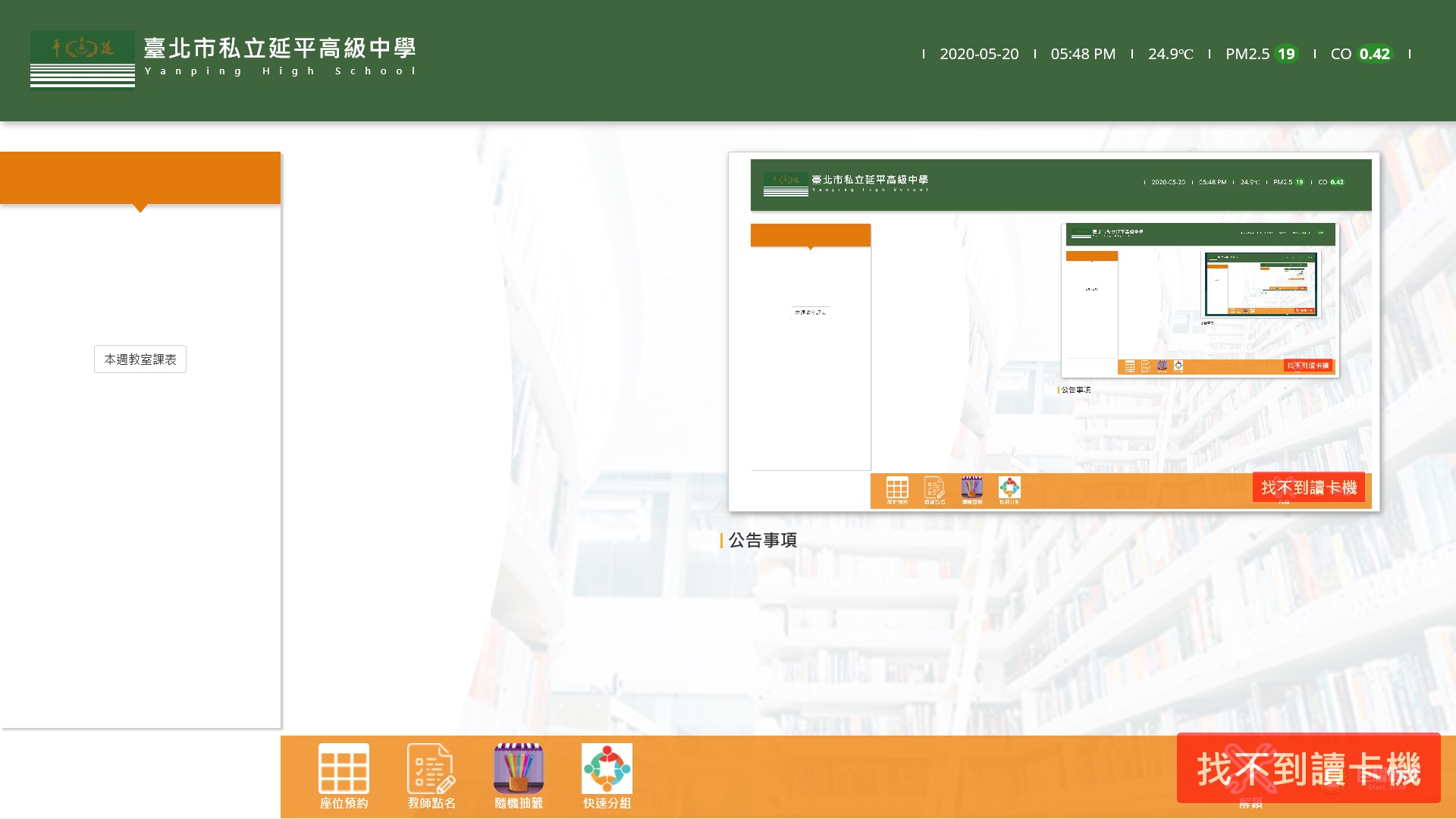
It featured (and possibly still features) green and orange as primary accent colors, and ran on a WebView based on Internet Explorer 11. Besides the fact that colour selections weren’t particularly great due to it being based on the colours of the school flag, I also identified several issues for improvement:
- The interface was very sluggish for some unknown reason, though it didn’t impact operation much since the majority didn’t involve animations. These stutters are only visible during the trigger of a Bootstrap Modal.
- Many teachers at that time were still not familiar with the system, or were struggling to find certain buttons.
- I believed that the display should be used for much better purposes, like displaying the time or the current course block.
And thus the first ever schedule query system was born, built planinly on a single HTML file using Adobe Dreamweaver CS4.

The first ever schedule query system featured a very simple setup, and most code are assisted by Dreamweaver as I wasn’t familiar with basic HTML or JavaScript syntax.
It featured two functions precisely: The current course block, which is constructed in a comically large if else statement, and the full schedule table, presented in a single jpeg. The background is a slideshow in JQuery Backstretch.
Thanks to Terry for teaching me the basic if else syntax of JavaScript that made this possible.
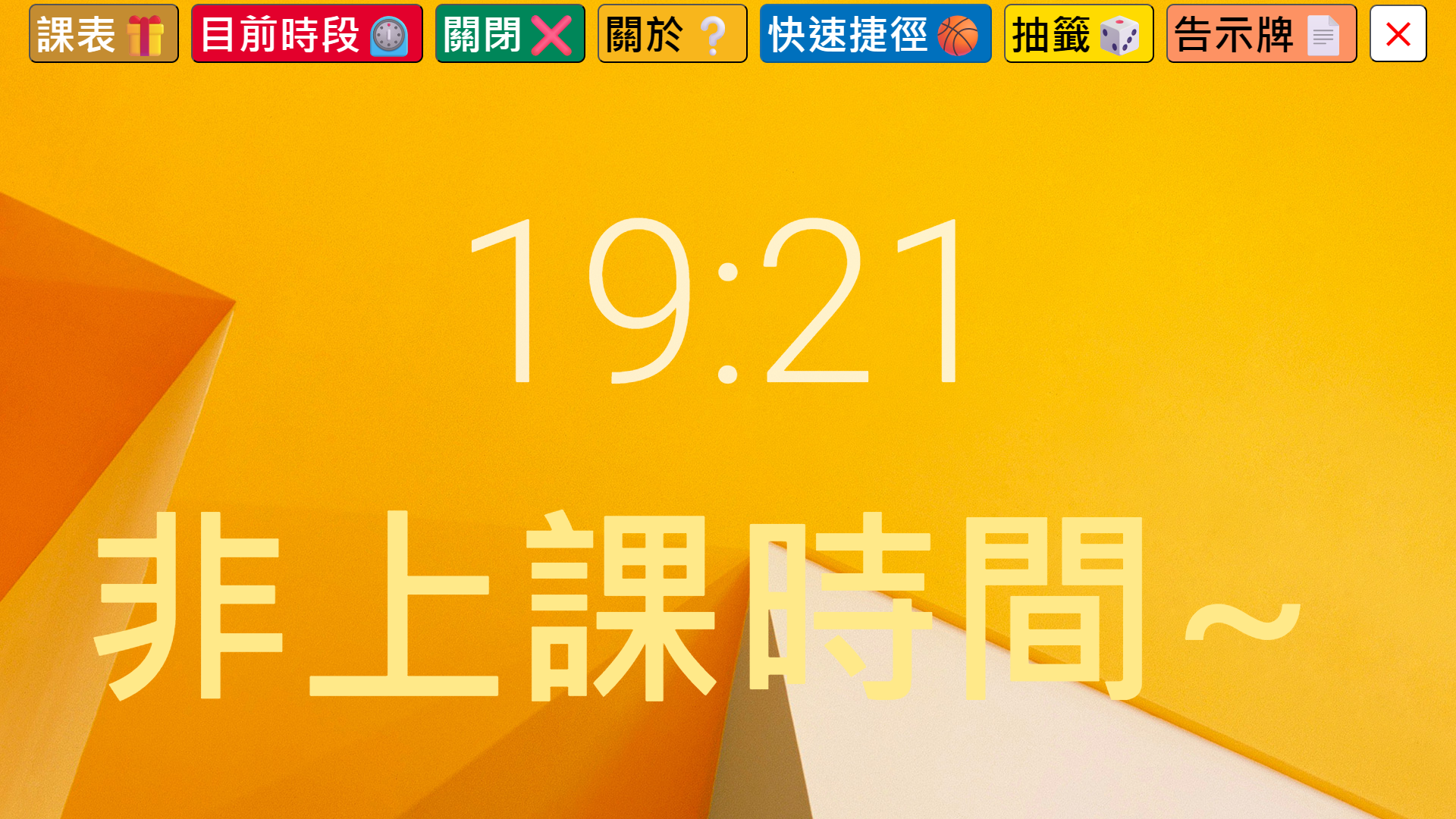
The first ever revision to the system saw some massive upgrades. I learned how to properly style colours, Added a bunch of functions into a top menu bar, and added some helpful instructions.
- Styling: I added some custom fonts in it, and styled the top menu bar colours to the Taipei Metro Line Colours
- Random Draw(抽籤): The custom rebuilt draw function features more ways to draw people by the request of our biology teacher. The teacher liked to draw people by doing arithmetics on the current date, so implemented that, with an easter egg to turn back to the teacher when encountering invalid results.
- Shortcuts(快速捷徑, not available in Demo): Allowed people to quickly jump to some sites offering NBA livestreams (legality debatable) during game season.
- Bulletin Board(告示牌): Allowed for temporary announcements such as course time adjustments or general matters.
- Close(關閉): By this time the system was not integrated with the main ITKiosk program just yet, so I made instructions on how to exit Microsoft Edge full screen mode and return to ITKiosk for taking attendance.
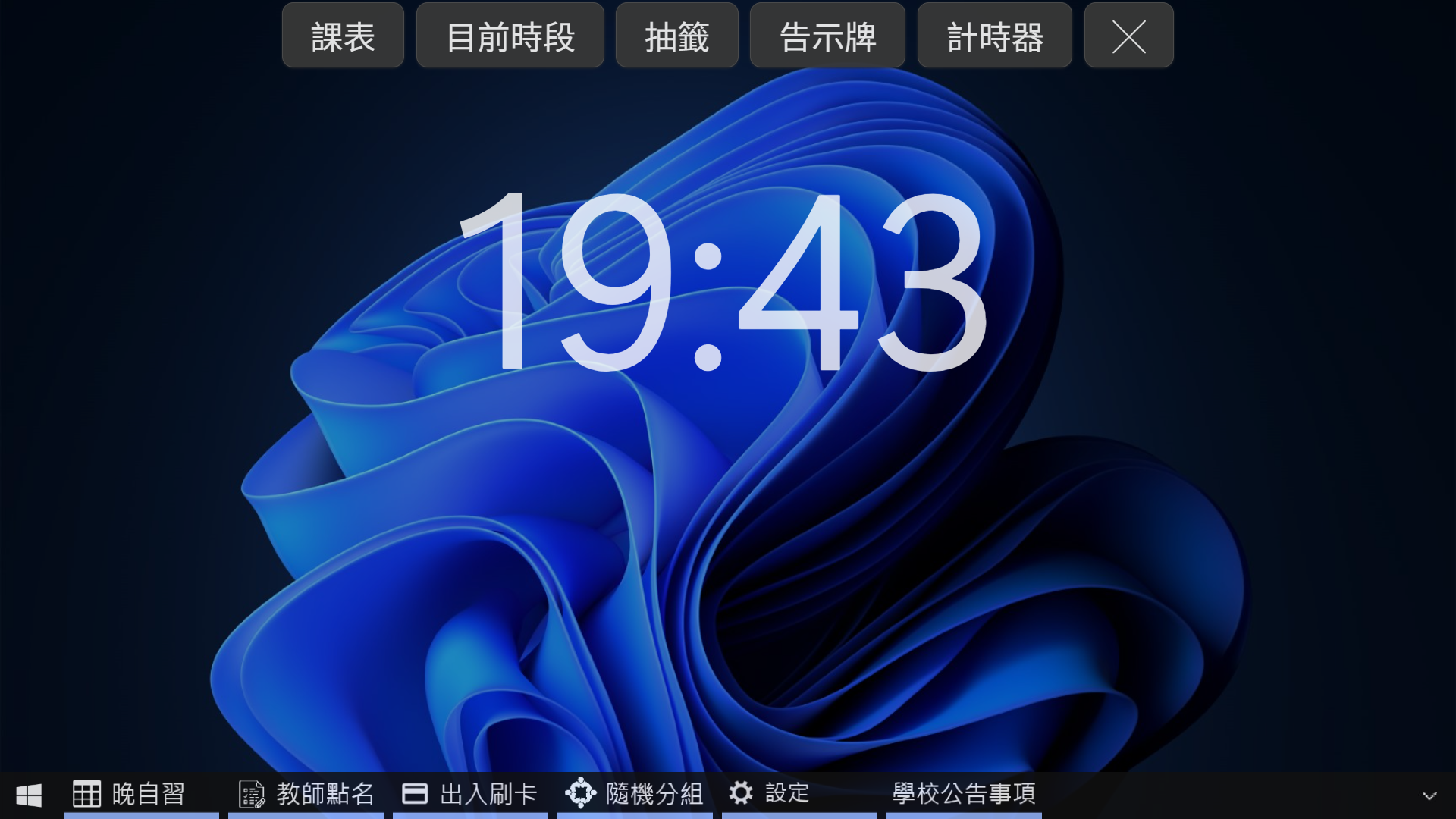
As you can see in the picture, there were two menu bars. As my web developing skills continued to grow, I was still figuring out how to interact between IFrames. But this was the first revision to integrate into the existing ITKiosk system, so the user didn’t have to switch between two programs anymore.
- Styling: The theme was based on the newly released Windows 11, with rewritten CSS properties.
- Menu Bars: The top menu bar was for the existing functions in my interface, while the bottom Windows 10-styled menu bar provided access to ITKiosk tools such as taking attendance or seat reservation.
- Random Draw(抽籤): The random draw function in this revision replaced the fixed-count methods with a number pad to simplify the process, so a teacher can draw more students if needed.
- Timer(計時器): A timer function was added to provide easy access to set a timer in an exam, for instance.
- Bulletin Board(告示牌): The bulletin board started to support text edit mode, with support for changing colours and text sizes.
- Settings(設定): At this time I was experimenting with reading card info from the card reader, so I added a small utility function for reading a NFC card’s serial number and displaying on the screen. The panel also added a utility function to sign on using your card serial number instead of placing a physical card at the reader. (If you’re questioning how this isn’t problematic, we’ll get to that later)
- Miscellaneous Interface Changes: Several items were moved such as the unlock into Windows function being moved into the Windows Start key, and text-based announcements as a separate modal.
- Sign On(刷卡簽到, ITKiosk Original): A modified interface to do sign on when arriving and leaving school, and had two themes to select, Taipei Metro themed or Windows Hello themed
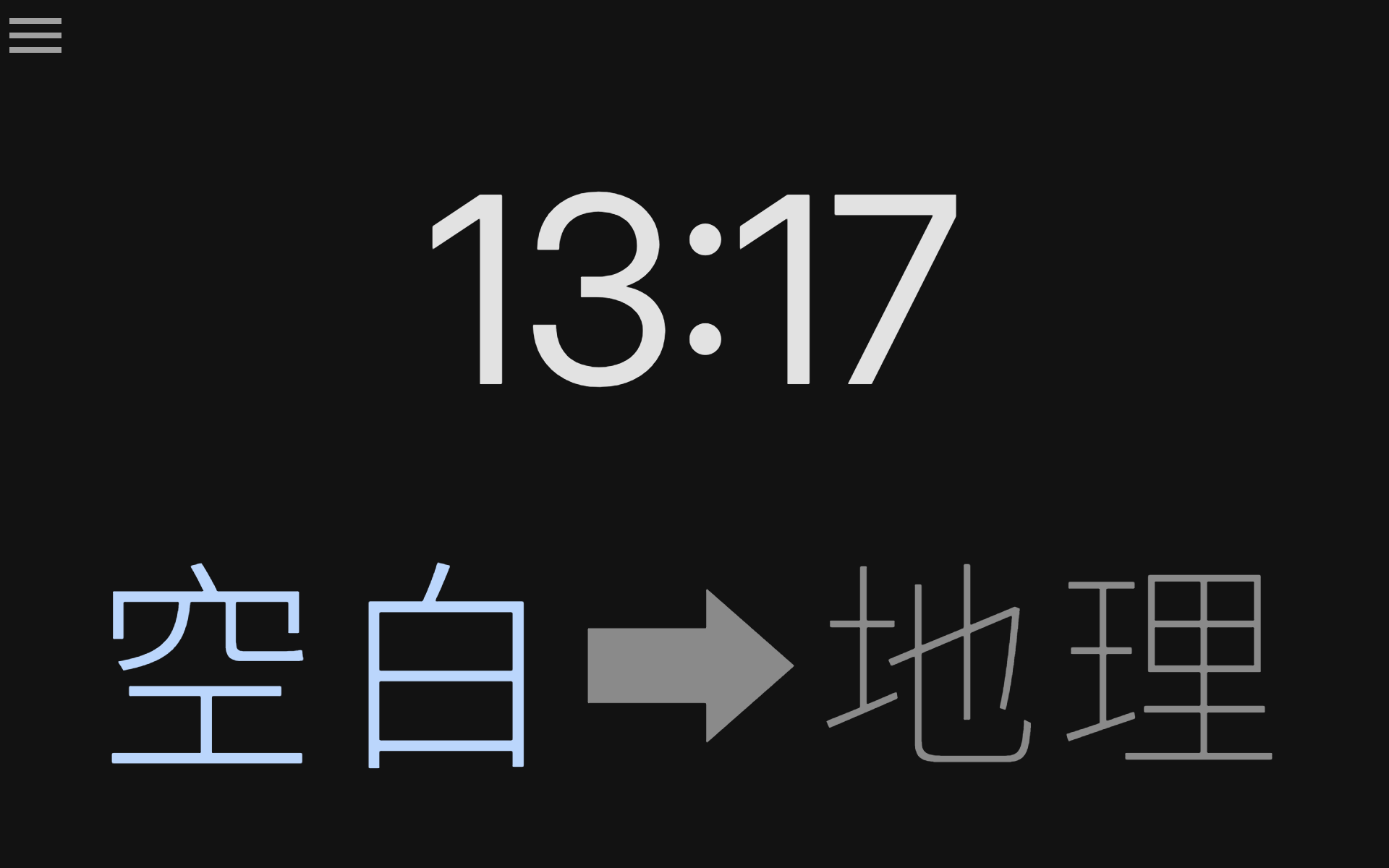
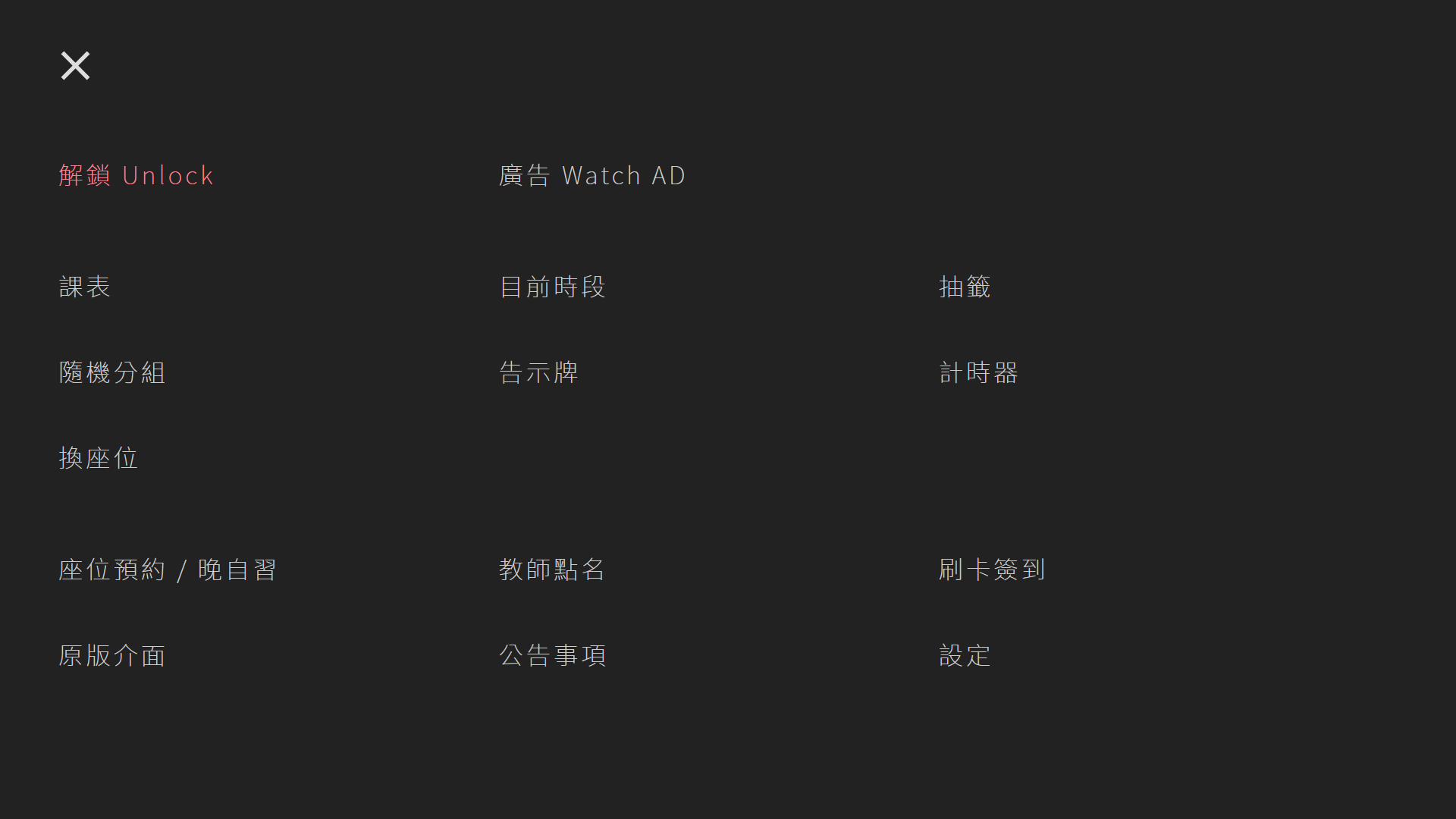
The image showed the new redesigned menu that finally integrated both menu bars into one big menu, with a prominent red unlock button at the top. The background was also removed to maintain interface simplicity and clarity.
- Styling: The interface was based on dark mode with thinner fonts and flatter, more consistent UI.
- Original UI(原版介面): I actually added this function for two reasons. For one, some teachers would really just prefer to original UI, for another some teachers didn’t like the fact that I modified the system, so when switched to this mode they wouldn’t suspect a thing.
- Seat Reservation(座位預約, ITKiosk Original): Besides the consistent dark UI, I also added Remove Prompt(移除提示) to remove the success prompt which blocked the screen preventing further action, and Refresh(重新整理) to refresh the current status.
- Taking Attendance(教師點名, ITKiosk Original): I added a selection of card IDs for teachers to use to simulate a physical card when forgetting to bring to the class. (Again, highly problematic)
- SAS(Seat Arrangement System, 換座位): By request of the teacher, I designed a system to quickly arrange a random seat table since our class rotated once bi-weekly.
The new menu layout also provided some flexibility, like restoring the advertisement slot since it was removed in the very first version. Also by leveraging Bootstrap Modals, we could do even more.
Intermission: The Tragic Twist (November 2022)
At this point, everything seemed to be working just fine, with a few hiccups here and there. Also addressed some common issues and people’s complaints and claims about the accuracy of the seat arrangement system. But what comes next was a combination of greed and idiocy.
You see, after having a the original ITKiosk system and the sign-on system fitted to our needs, my greed wanted to take it further, not in a good way. The last piece of the puzzle was the Library Sign On Feature, which you use to sign on when arriving at the library at night. I didn’t even plan for it to stay anyways. But just as I thought nothing could have gone wrong, I was caught in the act plugging my big ass keyboard into the library kiosk computer.
I was taken to exhortation. What came next is the realisation behind the seemingly inoffensive motivation.
The obvious questions in the way were the legality of this kind of modification. I was handling someone else’s proprietary product whose license I had no knowledge about. The second question is the concern about the exposure of personal information.
The ITKiosk system’s structure and methods are freely exposed in pure JavaScript and HTML, neither of which are hard to process without obfuscation. The concern was that getting a hold of a copy of ITKiosk along with its relevant GUIDs and client IDs simply allows ANYONE to access the student information and photos of the ENTIRE CAMPUS. It could easily be misused by bad actors if it was ever public.
In addition, to address the previous issues, the ability to take attendance without a card simply took away the verification part of the process, which could have lead to intentional manipulation of attendance records (not that it has happened ever, but it’s a possibility).
Intermission 2: Even Worse (November 2023)
The other part of this tragic twist made it even worse. You see, this project taught me a lot about HTTP Requests and how they work, and I took it even a further, I proposed the idea of putting the sign on HTTP Request inside a Siri Shortcut so that anyone could have taken attendance on their phone, which was a terrible idea that would 100% be misused.
It all came to light when people were caught signing on while not being at school. The administrator checked the IP addresses of incoming request (which I totally overlooked) and found a bunch of non-school IP addresses. This already made it incredibly easy to track down suspicions. It turned out to be a lot of them, since I discussed this potential idea with a LOT of people.
If I recall correctly, this issue became really serious when someone tried to jump off a building at home while signed in on the school system.
So what’s the lesson here?
The level of ignorance and confidence I had in this project was very high-school-minded. I definitely didn’t consider the consequences of all of these shit thoroughly, not to mention that the majority of the intention was very light-hearted at start. But I also shouldn’t underestimate the cybersecurity measures of a system that literally runs the WHOLE Taipei City education infrastructure.
And both of these happened to be around the week of the school anniversary, how fitting.
What’s next?
After writing so many diaries out of frustration, I kind of lost faith in what was a very flawed and questionable project. So I sat on it for years. I don’t think my friends have seen me being so down like that before.
I shifted my attention to other projects, such as Mobile YP(行動延平), which used web crawling to transform the dated school website into a very mobile friendly interface. There’s no way that can get me in trouble by utilising publicly accessible information. (Except for that one time when my app accidentally DDoS’ed the school server)
I also started working on a completely new project called YPGuidedAccess, which is based on Electron.js to realise what a regular website can’t touch, such as executing EXEs.
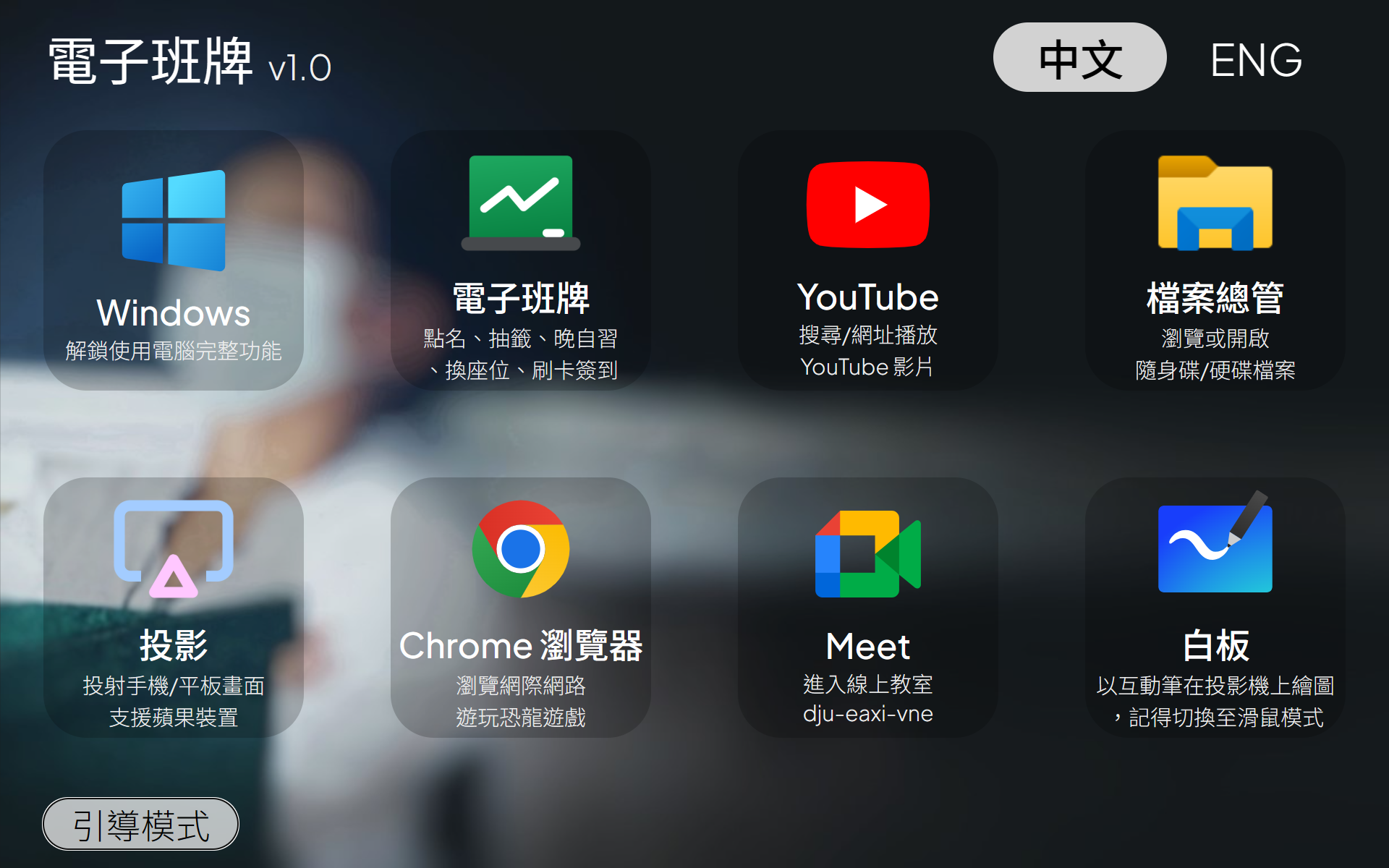
This project itself continues what I still believe should be done, clear and big buttons for accesibility, while completely separating from the main ITKiosk program. Which meanws this can be used standalone without any ITKiosk modification. Unfortunately I stopped working on it before I could finish all the features. It even comes with a multi-lingual interface!
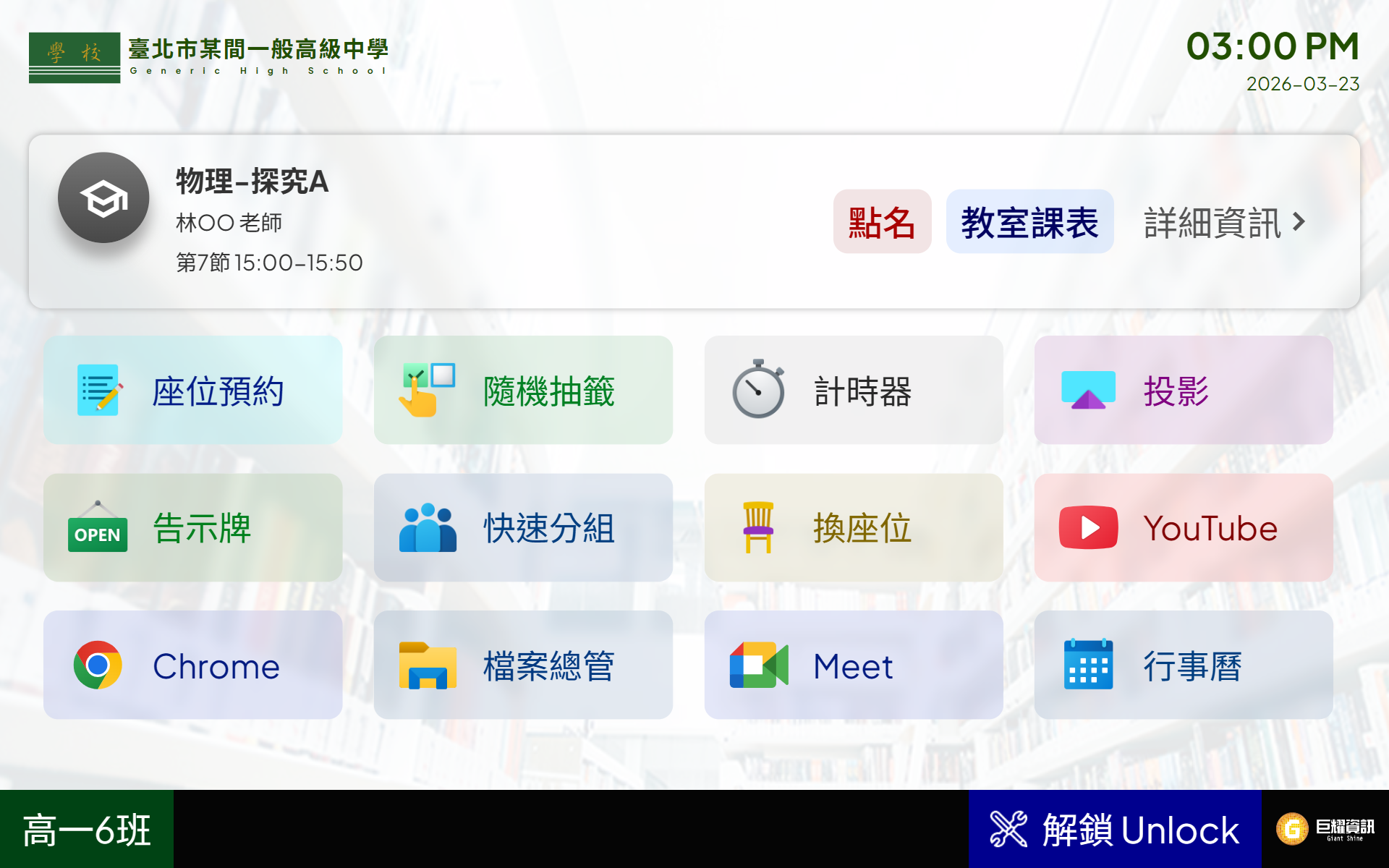 The last revision happened at an unknown date. It featured another major revamp, but somewhat closer to the original design. It was the fusion of the original ITKiosk, my Schedule Query System, and the YPGuidedAccess system. The fundamental parts of the original UI was largely unchanges, only some changes to the top and bottom bar. This particular one is what I would call the matured ITKiosk design of all time, along with a sleek screensaver!
- Styling: Reverted back to Light mode, but with even more consistent styling
- Menu: The top being the current status, the middle are all the feature items, and the bottom was a persistent unlock button in the familiar position.
- The Fusion of Everything: Almost all the functions from the three projects are combined into one.
- Removal of Controversial Elements: I have removed the features regarding simulating cards and impersonation elements.
Moving to Electron.js
That may not seem like my much compared to my very aggressive approach for the most part, but the final revision had one of the major architectural breakthroughs, moving entirely to Electron.js. By relying on the Chromium V8 Engine, this enabled many performance gains:
- Up to 3x faster launch speed
- Resolved the frame drops by moving to an entirely new stack
- Compatibility with modern web technologies, moving away from ActiveX controls
- Reduced the level of unnecessary DLLs
- Simplified the tech used by NOT touching the Windows Registry, and interracting with the card reader by purely relying on the Web Serial API
On the added bonus, I also moved the very original ITKiosk code to the new stack and worked flawlessly (except for the fact that I cannot turn off the beeping sounds from the card reader, and the fact that if you accidentally launch the legacy version, it’ll lock the text stream to not be read by the new version)
Conclusion
I guess there’s not really much to say besides the fact the this project was full of ups and downs. I wouldn’t want to go this carelessly again, but I wouldn’t learn so many things without ever going through this stuff.
I never really mentioned about how the teachers reacted to each of the new revision. Firstly, the feedbacks were not really prominent, although some teachers did notice after the project went defunct, and asked for the reason.
There’s not one approach that can fit everyone’s taste or experience, and trying to design something as universal as possible is actually really hard. Some people even struggle to read the information on the screen first when encountering something not familiar. While you can’t please anyone, working on this direction is surely a great way to start.
But what I find really important is that you should weigh in the pros and cons before trying to customise for one specific person. It might end up costing you a lot of time for very little benefit over all.
Future Prospects
No. I don’t see the future of this project unless someone from YP want to commission it back from me, which I don’t see it happening any time soon.